
Matter Smart Home Hubs: The Future of Your Connected Home
What Is a Matter Smart Home Hub and Why Does It Matter?
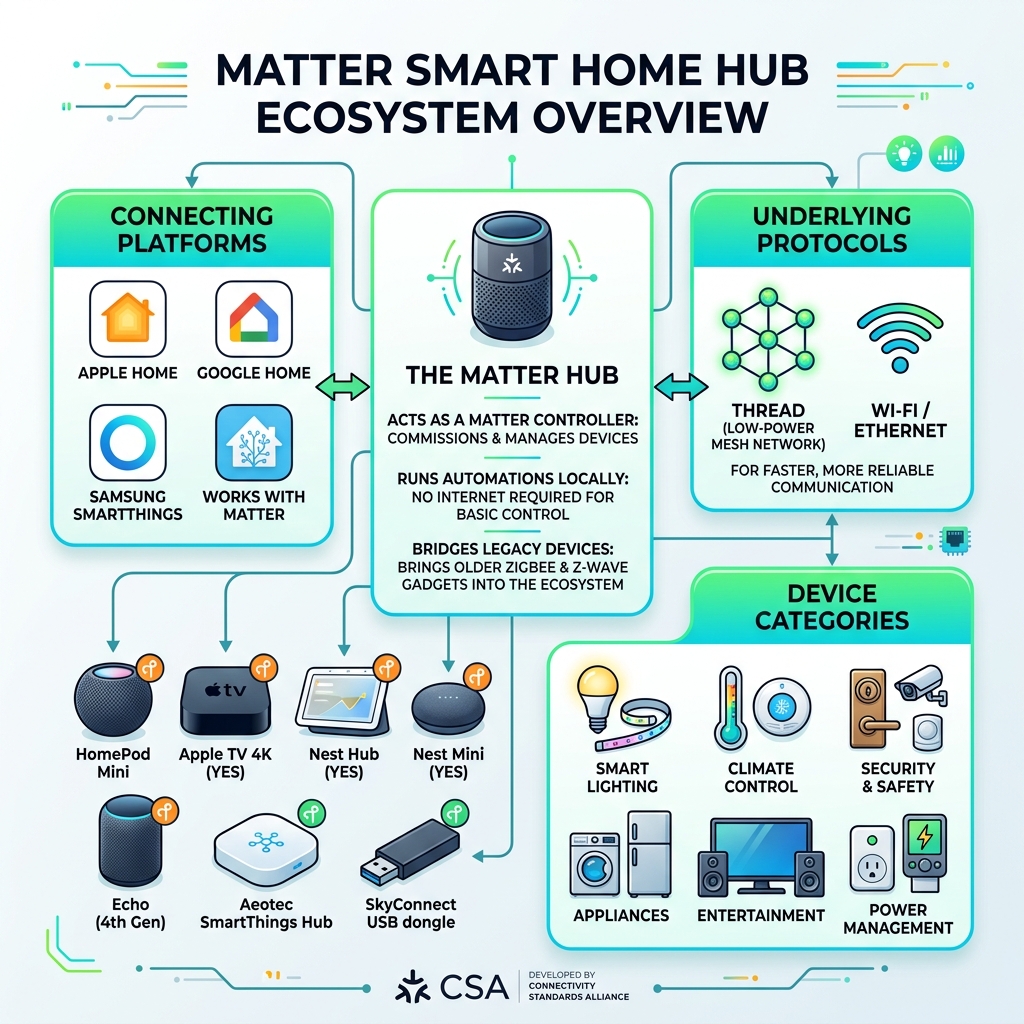
A matter smart home hub is the central device that lets smart home gadgets from different brands talk to each other using the Matter protocol — a universal, open-source standard built for interoperability, security, and local control.
Quick answer: What does a Matter smart home hub do?
- Connects devices across brands — Philips, IKEA, Google, Apple, Amazon, and hundreds more
- Acts as a Matter Controller — the command center that commissions and manages your devices
- Runs automations locally — no internet required for basic control
- Bridges legacy devices — brings older Zigbee and Z-Wave gadgets into the Matter ecosystem
- Supports Thread — a low-power mesh network for faster, more reliable device communication
Here is a quick overview of the main platforms and what hardware you need:
| Platform | Example Hub/Controller | Thread Support |
|---|---|---|
| Apple Home | HomePod Mini, Apple TV 4K | Yes |
| Google Home | Nest Hub, Nest Mini | Yes |
| Amazon Alexa | Echo (4th Gen) | Yes |
| Samsung SmartThings | Aeotec SmartThings Hub | Yes |
| Home Assistant | SkyConnect USB dongle | Yes |
Before Matter arrived, setting up a smart home was frustrating. You bought a smart bulb from one brand and a thermostat from another — and they refused to cooperate. You ended up juggling three apps, two hubs, and a lot of patience.
Matter changed that. Launched officially in October 2022 by the Connectivity Standards Alliance (CSA) — with founding support from Amazon, Apple, Google, and the Zigbee Alliance — Matter gives every compatible device a shared language. One app. One setup process. Devices that actually work together.
And for homeowners trying to cut heating bills and manage home energy more efficiently, that kind of seamless control is a real advantage.
The best part? You may already own a Matter controller. Many Google Nest Hubs, Amazon Echo speakers, and Apple HomePod Minis received over-the-air updates to support Matter. No new hardware needed.
This guide walks you through everything — from choosing the right hub to setting up devices, sharing them across platforms, and building automations that save energy and add comfort to your home.
What is a Matter Smart Home Hub?

In the simplest terms, a matter smart home hub acts as the “brain” of your home. While the Matter protocol itself is the language your devices speak, the hub is the conductor ensuring everyone follows the same sheet music. Developed by the Connectivity Standards Alliance (CSA), Matter is an IP-based protocol. This means it uses the same underlying technology as the internet to allow devices to communicate.
Unlike older systems that relied heavily on the cloud (sending a signal to a server in another country just to turn on a light 10 feet away), Matter prioritizes local control. When you tap a button on your phone, the command goes straight to your matter smart home hub and then to the device. This results in lightning-fast response times and improved security, as your data stays within your four walls.
The Role of Thread in a Matter Smart Home Hub
You cannot talk about Matter without mentioning Thread. Think of Matter as the language and Thread as the high-speed, low-power highway. Thread is a mesh networking protocol designed specifically for the smart home.
Unlike Wi-Fi, which can get congested when you add 50 light bulbs, Thread devices talk to each other. If one device goes offline, the network “self-heals,” finding a new path for the signal. A matter smart home hub often includes a Thread Border Router. This component connects your Thread mesh network to your home’s Wi-Fi or Ethernet so you can control everything from your smartphone.
The benefits of Thread are significant:
- Low Latency: Devices respond almost instantly.
- Battery Efficiency: Sensors can last for years on a single coin cell battery.
- Reliability: No more “Device Unreachable” errors when your router gets grumpy.
For a deeper dive into the technical side, you can explore scientific research on Thread and IPv6.
Why Interoperability Matters for Consumers
Interoperability is just a fancy word for “playing well with others.” For us as consumers, it means freedom. You are no longer locked into a single ecosystem. If you love Apple’s interface but prefer Google’s smart speakers and Amazon’s smart plugs, Matter allows them to coexist peacefully.
This simplified setup reduces the “tech headache” that often prevents people from adopting smart technology. It also contributes to reduced e-waste; because devices are forward-compatible, you won’t have to throw away perfectly good hardware just because you switched from an iPhone to an Android. Furthermore, a unified system makes it much easier to manage home resources. You can find more info about smart home energy automation to see how these connected devices work together to lower your carbon footprint.
Key Components: Controllers, Bridges, and Border Routers
Understanding Matter requires learning a few new terms. It can be a bit of a “alphabet soup” at first, so let’s break down the roles of different hardware.
| Component | Primary Role | Example |
|---|---|---|
| Matter Controller | The “Brain” that manages the network and runs automations. | Apple TV 4K, Google Nest Hub |
| Matter Bridge | The “Translator” for older Zigbee/Z-Wave devices. | Philips Hue Bridge, Aqara Hub M2 |
| Thread Border Router | The “Gateway” between Thread devices and your Wi-Fi. | Amazon Echo (4th Gen), Nanoleaf Shapes |
Matter Controller
The Controller is the most important piece. It holds the “credentials” for your smart home (the Matter Fabric). Every Matter setup needs at least one Controller. It handles the administrative tasks, such as adding new devices and ensuring that your voice assistant can reach your smart lock.
Matter Bridge
Do you have a drawer full of older Zigbee bulbs or Z-Wave sensors? Don’t toss them! A Matter Bridge acts as a translator. It speaks Zigbee on one side and Matter on the other, allowing your “legacy” devices to show up in your Matter-enabled app just like brand-new hardware. For those interested in the nitty-gritty, you can check the technical details on Matter Specifications.
Hardware Requirements for Your Matter Smart Home Hub
To get started, you generally need:
- A Smartphone or Tablet: For the initial setup and Bluetooth commissioning.
- A Stable Network: Wi-Fi (usually 2.4GHz for setup) or an Ethernet connection for the hub.
- A Dedicated Controller: While some phones (like the iPhone 15 with iOS 18) have basic Matter support, a dedicated matter smart home hub is required for remote access and complex automations.
Currently, Matter supports a wide range of device categories, including:
- Light bulbs and switches
- Plugs and outlets
- Thermostats and HVAC controllers
- Door locks
- Blinds and shades
- Security sensors (motion, contact)
- Media devices (TVs and streaming players)
Understanding the Matter Fabric
The “Matter Fabric” is a virtual private network that spans your entire home. When you add a device to your hub, it is assigned to a Fabric. This Fabric is secured using high-level encryption and device attestation, which ensures that the device is genuine and hasn’t been tampered with. Matter also uses a Distributed Compliance Ledger, a secure way for hubs to verify that a product is officially certified by the CSA before allowing it onto your network.
Setting Up and Sharing Devices via Multi-Admin Mode
One of the coolest features of a matter smart home hub is the setup process. Gone are the days of pressing “pair” buttons and hoping for the best.
Step-by-Step Installation Guide
- Power Up: Plug in your matter smart home hub and connect it to your router (Ethernet is always preferred for stability).
- App Sync: Open your chosen app (Apple Home, Google Home, etc.) and ensure your phone’s Bluetooth is on.
- Scan the Code: Every Matter device comes with a unique QR code. Simply scan it with your phone’s camera.
- Commissioning: The hub and the device will perform a “handshake” via Bluetooth to exchange Wi-Fi or Thread credentials.
- Assign and Name: Give your device a name and assign it to a room.
- Update: Always check for firmware updates immediately to ensure you have the latest security patches.
By streamlining this process, you can focus on the benefits, like maximizing efficiency with smart home energy saving techniques.
Sharing Devices Across Different Platforms: Multi-Admin Mode
This is the “magic” of Matter. Let’s say you use an iPhone, but your partner uses an Android. In the old days, you were stuck. With Matter’s Multi-Admin mode, you can share a device across multiple ecosystems simultaneously.
- How it works: You go into the settings of your primary app (e.g., Apple Home) and tap “Turn on Pairing Mode.”
- Generate a Code: The app will generate a temporary 11-digit setup code.
- Add to Secondary App: Open the Google Home app on the Android phone, tap “Add Device,” and enter that code.
- Simultaneous Control: Now, both apps can control the same light bulb. If you turn it off on the iPhone, the status updates instantly on the Android.
Local Control, Security, and Energy Efficiency
Security is at the heart of the Matter standard. Because Matter prioritizes local communication, your smart home doesn’t “break” if your internet goes down. Your scheduled porch lights will still turn on, and your motion sensors will still trigger your alarms.
Creating Advanced Automations and Routines
With a matter smart home hub, you can move beyond simple “on/off” commands. You can create complex routines that save time and money:
- Triggers: “When the sun sets…”
- Conditions: “…and if the temperature is below 18°C…”
- Actions: “…then close the blinds and set the thermostat to 21°C.”
Using these sensors effectively is key to a modern home. You can learn how to utilize smart devices for superior energy saving to maximize these automations.
Impact on Home Energy Management
Matter is a game-changer for energy efficiency. By centralizing control of your thermostats, lighting, and smart plugs, you can get a bird’s-eye view of your consumption.
- Smart Thermostats: Matter 1.4 introduces better scheduling and solar integration.
- Power Plugs: Monitor which appliances are “vampires” sucking power while on standby.
- Real-time Data: Some hubs now support energy reporting, showing you exactly how much electricity your home is using in real-time.
The Future of Matter: Version 1.4 and Beyond
The Matter standard is not static; it evolves every six months. As of late 2024 and heading into 2025, we are seeing the rollout of Matter 1.4.
Current Limitations and “Construction Sites”
We have to be honest: Matter isn’t perfect yet. There are still some “construction sites” in the standard:
- Feature Parity: Sometimes, a manufacturer’s own app has more features (like custom colors or advanced settings) than what shows up in the Apple or Google Home app.
- Thread Fragmentation: Until Thread 1.4 is fully adopted, having Thread Border Routers from different brands (e.g., one from Google and one from Apple) can sometimes create two separate mesh networks instead of one big one.
- Category Gaps: While basics are covered, complex devices like robotic vacuum cleaners and EV chargers are still being refined in the code.
What to Expect in Matter 1.5
Looking ahead, Matter 1.5 and upcoming updates are expected to bring:
- Enhanced Camera Support: Better integration for doorbells and security cameras.
- Solar and Battery Management: Deep integration for home battery systems and solar inverters.
- Improved Scalability: Support for larger installations, like apartment buildings or small offices.
Frequently Asked Questions about Matter Hubs
Do I need a new hub to use Matter devices?
Not necessarily! If you have a relatively modern smart speaker or mesh Wi-Fi system (like an Echo 4th Gen, Nest Hub 2nd Gen, or eero router), it likely received a software update to become a matter smart home hub. Check your manufacturer’s website for “Matter Controller” support.
Can Matter hubs control my existing Zigbee and Z-Wave devices?
Only if the hub specifically includes those radios and acts as a Matter Bridge. For example, the Aeotec SmartThings Hub and the Aqara Hub M3 are excellent at this—they “bridge” your older sensors so they appear as Matter devices to the rest of your home.
Does a Matter smart home work without an internet connection?
Yes! One of the biggest selling points of a matter smart home hub is local control. While you need the internet for initial setup and remote control (when you’re away from home), your internal automations and manual controls work perfectly fine even if your ISP has an outage.
Conclusion
At Financefyx, we believe that technology should make your life easier, not more complicated. The shift toward a unified matter smart home hub ecosystem represents the biggest leap forward in home automation in twenty years. By choosing Matter-compatible devices, you are protecting your investment and ensuring that your home remains “smart” for years to come.
Whether you are looking to save money on energy bills or simply want your lights to turn on when you walk into the room, Matter provides the foundation. We invite you to explore the latest Matter-compatible smart devices and start building your seamless, connected home today. The future isn’t just coming—it’s already plugged in and ready to go.
