
The Ultimate Arduino Solar Tracker Project for Beginners
Why an Automatic Solar Tracker Project Can Transform Your Energy Output
An automatic solar tracker project is a DIY system that moves your solar panel to follow the sun across the sky — so you capture more energy throughout the day instead of losing it to a fixed, stationary angle.
Here’s what you need to know at a glance:
| Tracker Type | Energy Gain vs. Fixed Panel | Complexity |
|---|---|---|
| Fixed panel | 0% (baseline) | Very low |
| Single-axis tracker | +20–25% | Moderate |
| Dual-axis tracker | +30–40% | Higher |
The core idea is simple: a solar panel produces the most power when it faces the sun directly. A fixed panel misses out on morning and evening sun. A tracker fixes that — automatically.
A basic Arduino-based build uses:
- An Arduino UNO microcontroller
- LDR (light-dependent resistor) sensors to detect sunlight direction
- Servo motors to physically rotate the panel
- A few resistors and a breadboard
The whole thing can be built for around $50–$120, depending on your components.
Whether you want to cut your energy bills, run an off-grid setup, or just learn hands-on electronics — this project delivers real, measurable results. Solar trackers generate 10 to 25% more electricity than stationary panels depending on location, and dual-axis designs push that even further.
This guide walks you through everything: how it works, what to buy, how to wire it, how to code it, and how to test it.
Quick look at automatic solar tracker project:
Understanding the Automatic Solar Tracker Project
When we talk about solar efficiency, we are essentially talking about the angle of incidence. Imagine holding a flashlight: the light is brightest when you point it directly at a wall. If you tilt the flashlight, the light spreads out and becomes dimmer. Solar panels work the same way. To get the maximum “juice,” the sun’s rays must strike the panel at a perfect 90-degree angle.
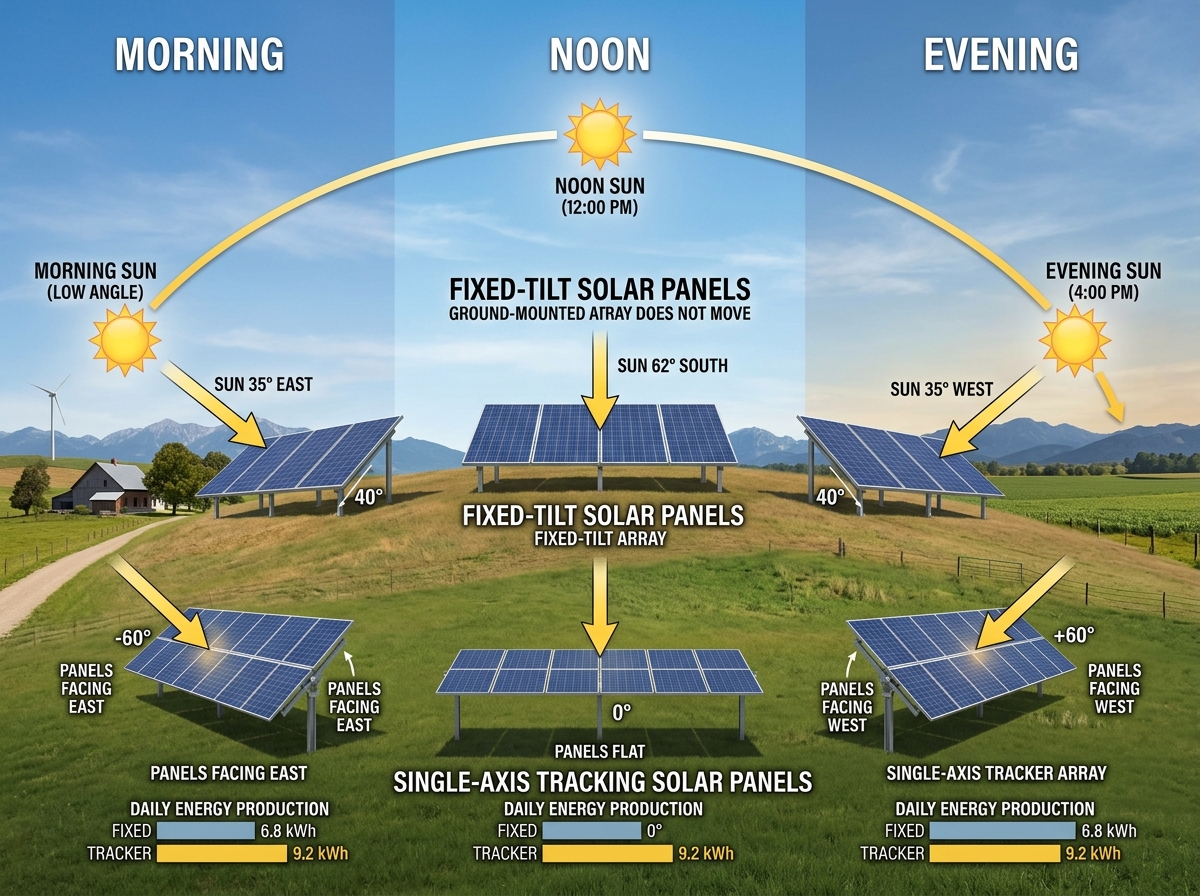
In a fixed installation, the panel only hits that “sweet spot” for a short time around noon. For the rest of the day, energy is wasted. By starting an automatic solar tracker project, we ensure our panels are always in that sweet spot. Research shows that dual-axis trackers can increase energy output by a staggering 30-40% compared to fixed installations. Even a simpler single-axis setup can provide a 20-25% gain.
For those just starting out, it’s helpful to understand the basics of how we harvest the sun’s rays. You can learn more about solar energy for beginners to build a solid foundation before diving into the mechanical builds.
Single-Axis vs. Dual-Axis: Choosing Your Automatic Solar Tracker Project Type
The first decision we need to make is how many ways our panel should move.
- Single-Axis Trackers: These usually track the sun from East to West (the azimuth angle). They are simpler to build and maintain. They are great for areas where the sun stays relatively high in the sky year-round.
- Dual-Axis Trackers: These track both the East-West movement and the North-South seasonal movement (the elevation). While more complex, they are the gold standard for efficiency, especially if you live at higher latitudes where the sun’s height changes significantly between summer and winter.
If you are looking for a detailed technical walkthrough on the more advanced version, check out this DIY Arduino Dual Axis Solar Tracker System Step-by-Step Guide.
Active vs. Passive and Sensor-based vs. Time-based Tracking
How does the tracker “know” where the sun is? There are two main ways to handle the “brain” of your automatic solar tracker project:
- Sensor-based (Active): This uses Light Dependent Resistors (LDRs) to physically look for the brightest spot in the sky. It’s reactive and works great for DIY projects because it’s intuitive. However, very cloudy days can sometimes confuse the sensors.
- Time-based (Chronological): This uses a Real-Time Clock (RTC) or GPS to calculate exactly where the sun should be based on your location and the time of day. This is “weather independent” because it doesn’t matter if it’s cloudy; the panel knows the sun is there anyway.
Some enthusiasts even repurpose vintage hardware for these builds. One maker famously built a sun tracker for his solar panels using a 1960s TV antenna rotator and modern microcontrollers—proving that with a little creativity, you can automate almost anything!
Essential Components and Mechanical Design
To get our automatic solar tracker project off the ground, we need a mix of brains, brawn, and “eyes.”
- Microcontroller: The Arduino Uno is our favorite for beginners. It’s robust and has plenty of community support.
- Sensors: We use four LDRs (photoresistors) for a dual-axis setup.
- Motors: Servo motors (like the SG90 for small prototypes) are ideal because they allow for precise angle control. For larger panels, you might need 12V linear actuators.
- Resistors: You’ll need 10kΩ resistors to create a “voltage divider” circuit, which allows the Arduino to read the light levels as a numerical value.
Before you start buying parts, it’s a good idea to explore more DIY solar panel projects to see how others have structured their builds.
How LDR Sensors Detect Sunlight
LDRs are the “eyes” of our project. Their resistance changes based on how much light hits them. By placing them in a “cross-configuration” with a small divider or “occulting bar” between them, we create shadows.
If the sun moves to the left, the left sensor gets more light than the right one. The Arduino sees this difference in the analog pins and tells the motor to turn left until the light levels are equal again. It’s a simple, elegant feedback loop.
Mechanical Structure and 3D-Printed Parts
The chassis needs to be sturdy but light enough for the motors to move. Many makers now use 3D-printed parts for the sensor housing and the panel brackets. This ensures the LDRs are perfectly aligned.
If you are building a larger, more permanent structure, you might use iron square tubes or wood. Just remember to include a counterweight! Balancing the weight of the panel reduces the torque on your motors, preventing them from burning out. For a deep dive into the nuts and bolts, see this complete mechanical and electronic design guide.
How to Build Your Automatic Solar Tracker Project
Ready to get your hands dirty? Let’s walk through the assembly.
- The Circuit: Connect your LDRs to the analog pins (A0 through A3). Use the 10kΩ resistors to pull the signal to ground. Connect your servo motors to the digital PWM pins (usually 9 and 10).
- Power Supply: Crucial tip! Do not power the servo motors directly from the Arduino’s 5V pin. Servos draw a lot of current when they move, which can cause the Arduino to reset or even fry the board. Use an external 5V power supply and remember to connect the grounds together.
- Assembly: Mount your servos so one handles the “tilt” and the other handles the “rotation.” Secure your solar panel to the top bracket.
Building the tracker is just one piece of the puzzle. If you’re interested in the bigger picture, check out our step-by-step guide to building a solar power plant.
Programming Your Automatic Solar Tracker Project
The code is where the magic happens. We use the Arduino IDE and the standard Servo.h library.
Our code should include:
- An Averaging Algorithm: This prevents the motors from “jittering” every time a tiny cloud passes or a bird flies by. It takes several readings and finds the average.
- Hysteresis: This is a fancy word for a “dead zone.” We tell the motor only to move if the light difference is greater than a certain threshold (like 10 or 20 units). This saves energy and wear on the motors.
- Night Mode: We can program the tracker to return to the East and wait for sunrise, or lay flat to protect itself from wind once the light levels drop below a certain point.
For those who want to skip the sensors entirely and use GPS, this Automatic Solar Tracker With GPS and ESP32 guide offers a professional, sensorless approach.
Testing and Measuring Performance
Once built, use a multimeter to measure your success. Check the voltage and current output of your panel at 9 AM, 12 PM, and 4 PM. Compare these numbers to a panel sitting flat on the ground.
You can even use software like PLX-DAQ to log this data directly into Excel in real-time. This helps you calculate exactly how much money you’re saving. For a broader look at the financial side, read our solar panels cost and savings analysis.
Troubleshooting and Advanced Enhancements
No project is perfect on the first try. If your motors are twitching, it’s likely a power issue or a lack of hysteresis in your code.
Solving Common Project Challenges
- Sensor Saturation: In very bright sunlight, LDRs can “max out.” Using an occulting bar (a small physical divider) helps create a clearer shadow for the sensors to track.
- Weatherproofing: If this is going outside, you must protect the electronics. Old ammo boxes or sealed plastic containers work great.
- Wind Resistance: Large panels act like sails. Ensure your mechanical structure is staked down and your motors have enough torque to hold the position.
If you’re worried about environmental factors, our ultimate guide to solar panel heat insulation covers how to keep your gear safe in extreme conditions. You can also explore this dual axis solar tracker with online energy monitor for inspiration on remote monitoring.
Future Features for Your Automatic Solar Tracker Project
Once the basics are done, the sky is the limit:
- IoT Integration: Use an ESP32 to send your power data to the cloud (ThingSpeak) so you can monitor your energy production from your phone.
- MPPT Controllers: Adding a Maximum Power Point Tracking controller ensures you are getting the absolute maximum wattage out of your cells.
- Mobile App: Build a dashboard to manually override the tracker if needed.
Don’t forget to think about where that energy goes! Learn about home battery storage for solar to make sure you’re using every watt you harvest.
Frequently Asked Questions about Solar Trackers
What is the estimated cost and complexity of a DIY tracker?
For a small-scale Arduino prototype, expect to spend between $50 and $120. It is a “medium” complexity project—perfect for someone who has finished a few basic Arduino tutorials but wants a real-world challenge.
How do cloudy days affect tracker performance?
On very overcast days, the light is “diffuse” (coming from everywhere). A sensor-based tracker might stop moving or enter a standby mode. However, as soon as the sun peeks through, it will snap back into position. Time-based trackers are unaffected by clouds.
Is a solar tracker worth the extra maintenance?
For small systems, the extra 30% energy might not be worth the cost of the motors and the risk of mechanical failure. However, for systems over 200W, or in locations where space is limited, an automatic solar tracker project is often more cost-effective than buying extra panels.
Conclusion
Building an automatic solar tracker project is one of the most rewarding ways to enter renewable energy. It combines electronics, coding, and mechanical engineering into a single tool that literally pays for itself over time. At Financefyx, we believe that energy independence starts with understanding the technology in our own backyards.
By following this guide, you aren’t just building a gadget; you’re participating in the global transition to clean, efficient power. Ready to take the next step? Start your journey into renewable energy today and see what else you can power with the sun!
